lotus labs
AI-Powered Updates Coming Soon to Your Favorite Apps



Slack: SlackGPT
SlackGPT is a new chatbot for Slack that can help users with a variety of tasks, such as finding information, scheduling meetings, and generating creative content. Powered by OpenAI's GPT-3 language model, SlackGPT will help you work smarter, learn faster, and communicate better. Each time you log in, you will be able to quickly get up to speed with one click as the AI technology can summarize all of a channel’s unread messages into a brief summary. SlackGPT also has the ability to automate emails or messages based on the audience further increasing daily productivity. Additionally, with AI assistance built natively into Slack’s message composer and canvas, Slack GPT can also help you tweak your drafts until perfection. With a few clicks, you can create content or adjust the tone at any point in your writing with options to shorten, elaborate, or change the tone.

Grammarly: GrammarlyGO
GrammarlyGO is a new mobile app available for iOS and Android devices that uses AI to help users with grammar, spelling, and punctuation. GrammarlyGO brings the power of generative AI to the Grammarly experience, providing assistance across the digital spaces you write in most. There are a variety of ways to use GrammarlyGO as it can keep track of the context of your writing as well as your preferred writing style while offering suggestions. You can accelerate your writing process by prompting GrammarlyGO with basic instructions to conceive polished drafts. You can simplify rewriting by inputting your written text into GrammarlyGO and letting the app offer different versions of your original ideas. Finally, you can facilitate brainstorming as GrammarlyGO can generate any idea or structure straight to the page you are already on. While users will be able to input 100 prompts per month into GrammarlyGO for free, they will need the premium version for more monthly inputs.
Zoom: ZoomIQ
The purpose of Zoom IQ is to be a smart companion that empowers collaboration and unlocks people’s potential by summarizing chat threads, organizing ideas, drafting content for chats, emails, and whiteboard sessions, and creating meeting agendas. As a result, this AI- add-on has many notable features such as being able to analyze meeting recordings and provide insights into how meetings are being run. This information can then be used to improve meeting performance and productivity. If you have to join a Zoom meeting late, you can simply ask Zoom IQ to summarize what you have missed in real-time and even ask further questions. If you need to create a whiteboard session for your meeting, Zoom IQ can generate it based on text prompts. If you need an additional perspective for a Zoom chat, you can use Zoom IQ to compose messages based on the conversational context. With its new AI innovations, Zoom appears to be poised for further growth.

Discover 3 AI tools that are useful for any professional including those for productivity automation and data analysis
65e0e1dcb09181168356dc07
lotus labs
© 2026 LOTUSLABS All rights reserved.


AI-Powered Updates Coming Soon to Your Favorite Apps
Slack: SlackGPT
SlackGPT is a new chatbot for Slack that can help users with a variety of tasks, such as finding information, scheduling meetings, and generating creative content. Powered by OpenAI's GPT-3 language model, SlackGPT will help you work smarter, learn faster, and communicate better. Each time you log in, you will be able to quickly get up to speed with one click as the AI technology can summarize all of a channel’s unread messages into a brief summary. SlackGPT also has the ability to automate emails or messages based on the audience further increasing daily productivity. Additionally, with AI assistance built natively into Slack’s message composer and canvas, Slack GPT can also help you tweak your drafts until perfection. With a few clicks, you can create content or adjust the tone at any point in your writing with options to shorten, elaborate, or change the tone.
Grammarly: GrammarlyGO
GrammarlyGO is a new mobile app available for iOS and Android devices that uses AI to help users with grammar, spelling, and punctuation. GrammarlyGO brings the power of generative AI to the Grammarly experience, providing assistance across the digital spaces you write in most. There are a variety of ways to use GrammarlyGO as it can keep track of the context of your writing as well as your preferred writing style while offering suggestions. You can accelerate your writing process by prompting GrammarlyGO with basic instructions to conceive polished drafts. You can simplify rewriting by inputting your written text into GrammarlyGO and letting the app offer different versions of your original ideas. Finally, you can facilitate brainstorming as GrammarlyGO can generate any idea or structure straight to the page you are already on. While users will be able to input 100 prompts per month into GrammarlyGO for free, they will need the premium version for more monthly inputs.
Zoom: ZoomIQ
The purpose of Zoom IQ is to be a smart companion that empowers collaboration and unlocks people’s potential by summarizing chat threads, organizing ideas, drafting content for chats, emails, and whiteboard sessions, and creating meeting agendas. As a result, this AI- add-on has many notable features such as being able to analyze meeting recordings and provide insights into how meetings are being run. This information can then be used to improve meeting performance and productivity. If you have to join a Zoom meeting late, you can simply ask Zoom IQ to summarize what you have missed in real-time and even ask further questions. If you need to create a whiteboard session for your meeting, Zoom IQ can generate it based on text prompts. If you need an additional perspective for a Zoom chat, you can use Zoom IQ to compose messages based on the conversational context. With its new AI innovations, Zoom appears to be poised for further growth.
Get ready for AI-powered updates coming soon to your favorite apps with enhanced features smarter recommendations and improved user experiences
65e0e1dcb09181168356dc08
lotus labs
© 2026 LOTUSLABS All rights reserved.

Natural Language to SQL queries to Business Insights for Dummies with a demo
It’s a busy day at the office, and you immediately need certain insights, let’s say about top agents or top regions of the last quarter, or you want to generate a leads list based on a certain business logic. In the pre-AI civilization era, you had to send the request to the corresponding person via email or communicate your requirement in a meeting or a call. Evolution in foundational LLMs has given rise to numerous use cases. Still, one of the most important skills for business decision-makers is the ability to obtain data or results directly from the communication between the LLM and databases. With an apt description of what is needed, the employee can get fuel (data) to communicate and act on their decisions with their team. The industry-wide phrase for this kind of use case is known as Text to SQL.
Let’s jump into our demo:
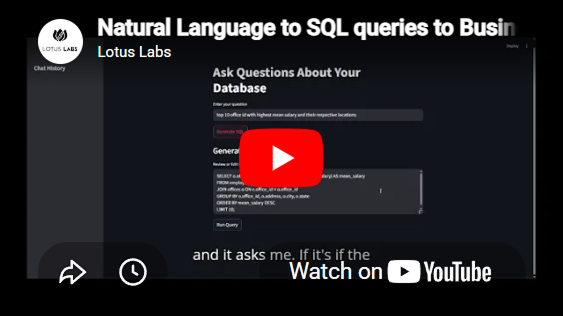
https://www.youtube.com/watch?v=5VUTYbplenQ
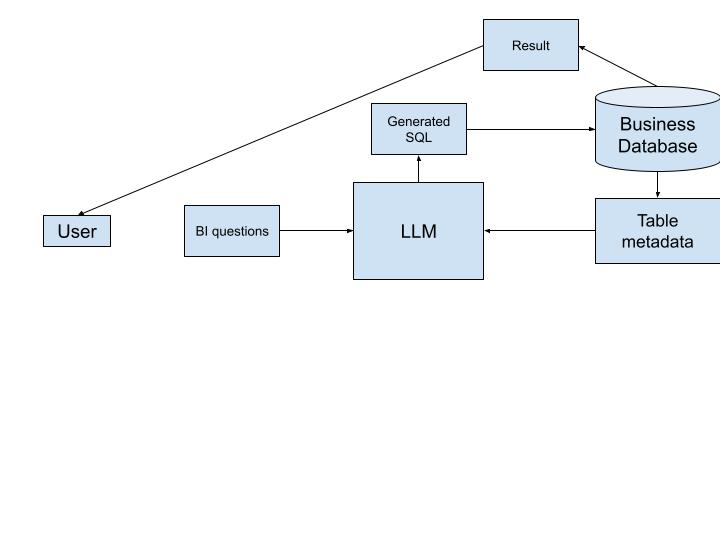
Fig 1:The architecture involved in our demo
Architecture Explanation: Enabling Natural Language BI with LLMs
This system architecture showcases how organizations can leverage a Large Language Model (LLM) to simplify access to business insights by allowing users to ask questions in plain English. The LLM intelligently translates these natural language questions into SQL queries that run against the business database, making business intelligence more accessible, intuitive, and efficient.
1. Starting with the User
At the heart of this architecture is the user, who could be a business analyst, sales executive, operations manager, or anyone seeking data-driven insights. Traditionally, such users would require SQL expertise or depend on data teams to access information. However, in this system, users simply enter their questions in natural language, for example, “What were the total sales in Q1?” or “Which region had the highest customer churn?”
These questions are referred to as BI questions; they represent common inquiries stakeholders make to better understand performance, trends, or operational bottlenecks.
2. The Role of the LLM
Once a BI question is submitted, it flows into the Large Language Model (LLM). The LLM is the intelligent core of the system, trained to understand natural language and capable of converting questions into structured SQL queries.
But the LLM doesn't generate SQL blindly. It needs to understand the underlying database schema, that is, the structure, names, and relationships of the tables it’s working with. This is where table metadata comes into play.
3. Using Table Metadata for Context
The table metadata includes details such as:
- Table names and their purposes (e.g., customers, orders, transactions)
- Column names and their data types
- Relationships between tables (e.g., foreign keys, primary keys)
This metadata is fed into the LLM so it can accurately generate SQL queries that conform to the specific structure of the business’s database.
For example, if the user asks, “How many new customers joined last month?”, the LLM uses the metadata to determine which table stores customer data, identify a relevant date column (like signup_date), and write a query that correctly filters and counts new entries from the last month.
4. Generating and Executing SQL
Once the LLM has both the question and the table structure, it constructs a SQL query tailored to extract the required data from the business database.
The system then executes this generated SQL query directly on the business database. The database returns the result of the query, which could be a number, a list of records, or even an aggregated summary.
5. Returning Results to the User
The final output, the result of the query, is sent back to the user in a readable format. This can be presented as plain text, a table, a chart, or integrated into a dashboard, depending on how the system is configured.
This result answers the user's original question, completing a full cycle from natural language input to actionable data insight, all without the user needing to write a single line of SQL.
Why This Matters
Users no longer need to rely on data engineers or BI teams for routine questions. It empowers non-technical users to interact with complex databases using a language they already know, while the LLM handles the complexity behind the scenes.
By combining natural language processing with database metadata and real-time SQL generation, organizations can:
- Enable faster decision-making
- Democratize data access
- Reduce the backlog of ad-hoc data requests
- Improve efficiency across teams
To work on similar and various other AI use cases, connect with us at
https://www.lotuslabs.ai/
To work on computer vision use cases, get to know our product Padme
https://www.padme.ai/
Natural Language to SQL queries to Business Insights for Dummies with a demo
687f1714674b97525a8ac50d